How to Set Up a Productive Work-From-Home Routine
For my first six months of working from home, I had no routine. I rolled out of bed, opened my laptop in pajamas, and worked until I remembered to eat lunch. Some days I started at 7 AM. Others at 10. I never had a clear end to the workday, so I would answer emails at 9 PM on the couch. I was technically working more hours than I ever had in an office, but I was getting less done and feeling exhausted all the time.
A Stanford study on remote workers found that work-from-home employees are 13% more productive than their office counterparts, but only when they have structure. Without a routine, the flexibility of remote work becomes its biggest liability. Here is the exact work-from-home routine I built after months of trial and error. It took my productivity from scattered to focused, and it keeps me sane as a mom of two who works from a converted bedroom closet.
Does a Morning Routine Really Affect Work-From-Home Productivity?
Yes. A morning routine creates a psychological transition from “home mode” to “work mode” that your brain needs when there is no commute to provide that shift. Research from the American Psychological Association confirms that clear boundaries between work and personal life reduce burnout and improve job satisfaction. A consistent morning routine serves as that boundary. It tells your brain that the workday has started, even though you haven’t left the house. People who skip this transition tend to feel scattered for the first hour or more of their workday.
The Morning Startup Routine (30 Minutes)
My morning routine is the anchor of my entire work-from-home schedule. It takes 30 minutes and happens at the same time every day, regardless of what my workload looks like.
My morning startup sequence:
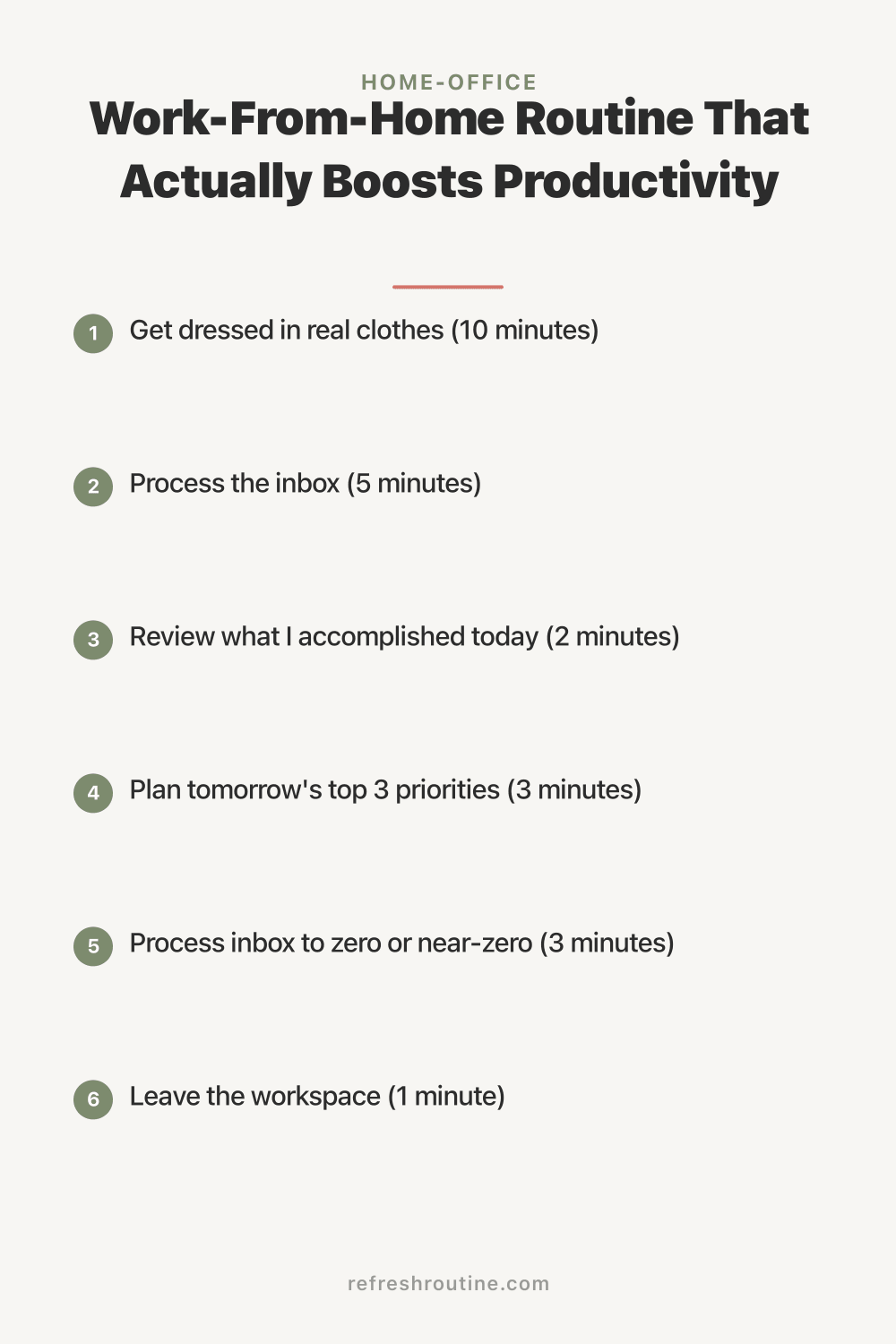
- Get dressed in real clothes (10 minutes). Not a suit. Not even jeans most days. But changing out of pajamas into actual clothing creates a mental shift. I noticed a measurable difference in my focus on days I got dressed versus days I stayed in sweats
- Make coffee and eat breakfast at the table, not the desk (10 minutes). Eating at my desk blurs the line between personal time and work time. The kitchen table is where I eat. The desk is where I work
- Sit down at the desk and review today’s schedule (5 minutes). I open my calendar, review my time blocks, and confirm my top three priorities for the day. This daily review connects to my time blocking method and takes less than five minutes
- Process the inbox (5 minutes). Quick scan only. Flag anything urgent, archive or delete obvious junk, and leave everything else for the designated email block later
Start time: 8:00 AM, every day. Consistency matters more than the specific time. My brain now associates 8 AM with “work starts” the same way it used to associate pulling into the office parking lot. That conditioning took about two weeks to develop, and now it’s automatic.
Set Up Your Physical Workspace
Your work-from-home routine is only as good as the physical space that supports it. You don’t need a dedicated home office, but you do need a designated workspace.
Minimum workspace requirements:
- A surface large enough for your laptop and a notepad
- A chair that supports your back (not the couch, not the bed)
- Adequate lighting (natural light plus a task lamp)
- A power outlet within reach
- Separation from high-traffic areas of the home
I work from a closet converted into a mini office. It’s about 20 square feet. But it has a door I can close, a desk at the right height, and everything I need within arm’s reach. If you’re working with limited space, our guide on small home office ideas covers how to maximize every inch.
The most important thing about your workspace is that you use it only for work. When you start associating a specific spot with focused work, your brain shifts into work mode when you sit there. If you also use that spot for Netflix, scrolling social media, and eating snacks, the association weakens. I made this mistake with my kitchen table for the first three months. It was both my dining table and my desk, and my brain never fully committed to either mode.
Our desk organization guide covers how to keep your workspace clutter-free and set up cable management, which directly supports the distraction-free environment a WFH routine needs.
Build Your Work-From-Home Schedule
Here is the daily work-from-home schedule I follow. It accounts for focused work, communication, breaks, and family responsibilities.
My daily WFH schedule:
- 7:00 to 7:30 AM: Wake up, personal hygiene
- 7:30 to 8:00 AM: Morning startup routine (dress, breakfast, desk review)
- 8:00 to 10:00 AM: Deep work block 1 (highest priority task, no email, no Slack)
- 10:00 to 10:15 AM: Break (walk around the house, refill coffee, stretch)
- 10:15 to 11:00 AM: Email and communications block
- 11:00 to 12:30 PM: Deep work block 2 (second priority task or meetings)
- 12:30 to 1:15 PM: Lunch (away from desk, non-negotiable)
- 1:15 to 2:45 PM: Collaborative work, meetings, or deep work block 3
- 2:45 to 3:00 PM: Break
- 3:00 to 3:45 PM: Admin tasks, email follow-ups, shallow work
- 3:45 to 4:00 PM: Shutdown routine
Total work hours: 7.5 hours. Of those, about 4 hours are deep, focused work. That is more productive time than most people get in a 9-hour office day. A Vouchercloud study found that the average office worker is productive for only 2 hours and 53 minutes per day. A structured remote work routine can nearly double that number by eliminating commute time, office chatter, and unnecessary meetings.
The Power of Real Breaks
One of the biggest mistakes I made in my first year of working from home was skipping breaks. I told myself I was being productive by working straight through. In reality, I was burning out and my afternoon work quality was terrible.
What a real break looks like:
- Leave your desk physically. Stand up and walk to another room
- Do something that is not screen-based. Make a snack, step outside, play with the dog, fold laundry
- Set a timer so you don’t accidentally extend your break from 15 minutes to 45
What is not a real break:
- Scrolling your phone at your desk
- Switching from work tabs to social media tabs
- Eating lunch while reading emails
I take three breaks during my workday: mid-morning, lunch, and mid-afternoon. The mid-morning and mid-afternoon breaks are 15 minutes each. Lunch is 45 minutes. On days I take all three breaks, I consistently produce better work in the afternoon than on days I skip them. The science supports this. Working in focused intervals with breaks in between aligns with how our brains sustain attention naturally.
How to Handle Distractions at Home
Home distractions are the number one challenge of remote work. Kids, pets, deliveries, household chores, the refrigerator. Here is what works for me:
For kids: My kids know that when my office door is closed, I’m in focus mode. Interruptions are for emergencies only. It took about a week of consistent reinforcement, but now they respect it automatically.
For household tasks: I allow chores only during scheduled breaks. If I notice something that needs doing during a work block, I write it on a sticky note and handle it later. This prevents the “I’ll just quickly do this” trap. Our daily cleaning routine shows how to fit cleaning into short daily windows.
For digital distractions:
- Close all non-work browser tabs during deep work blocks
- Put the phone in another room during focus time
- Use website blockers if social media is a problem
- Close Slack and email during deep work blocks
For noise: Noise-canceling headphones ($50 to $100) were one of the best investments I made. They signal to my family that I’m focused and block the background noise of a home with two kids.
The Shutdown Routine (10 Minutes)
The shutdown routine is just as important as the startup routine. Without it, work bleeds into personal time. I spent my entire first year of remote work checking email after dinner and “just finishing one more thing” at 10 PM. The shutdown routine fixed that.
My shutdown sequence:
- Review what I accomplished today (2 minutes). Check off completed tasks, note what rolled over
- Plan tomorrow’s top 3 priorities (3 minutes). Write them down so I don’t carry them in my head all evening
- Process inbox to zero or near-zero (3 minutes). Reply to quick items, flag items for tomorrow, archive the rest
- Close laptop and say “shutdown complete” out loud (1 minute). This sounds silly. I felt ridiculous the first time I did it. But the verbal cue works. It creates a definitive moment that the workday has ended. Cal Newport recommends this in Deep Work and I was skeptical until I tried it
- Leave the workspace (1 minute). Walk out and close the door if you have one
After the shutdown routine, I do not check work email or open my laptop. If I think of something work-related, I write it on a notepad and deal with it tomorrow morning. This boundary is non-negotiable.
Can You Be Productive Without a Dedicated Home Office?
Yes. About 60% of remote workers do not have a dedicated home office, according to surveys by FlexJobs. Productivity depends more on routine consistency and boundary-setting than on having a separate room. A designated corner of a bedroom with a consistent start time, shutdown routine, and clear work-life boundaries will outperform a fully equipped home office with no structure. If you’re working from a shared space, use physical cues like putting on headphones or opening a specific laptop to signal “work mode” to yourself and others.
Weekly Review and Adjustment
Every Sunday evening, I spend 15 minutes reviewing the previous week and planning the next one. This habit prevents my work-from-home routine from drifting.
Weekly review questions:
- Did I follow my startup and shutdown routines every day?
- How many deep work hours did I log?
- What disrupted my schedule? Can I prevent it next week?
- Did I take real breaks each day?
- What felt productive? What felt like wasted time?
The answers guide small adjustments. For example, I discovered that scheduling meetings before 10 AM destroyed my morning deep work block. So I moved all meetings to after 11 AM. These small tweaks compound into a significantly better routine over time. The time blocking method pairs perfectly with this routine and gives you a framework for assigning specific tasks to each block.
What I Wish I Knew About Working From Home
These lessons cost me months of frustration to learn. I hope they save you the same struggle.
The commute replacement is not optional. The commute provides a mental transition between home and work. Without it, you need an artificial transition. My startup and shutdown routines serve that purpose. Without them, work and life blur together in a way that leads to burnout.
You will overwork before you underwork. Most new remote workers worry about slacking off. The opposite is more common. I regularly worked 10 to 11 hour days my first year because I had no shutdown routine. I accomplished less in 11 hours without structure than I now accomplish in 7.5 hours with it.
Your family needs to be trained on your schedule. To my kids, “working from home” initially meant “Mom is home and available.” I had to explicitly teach them my schedule and the meaning of a closed door. This took about two weeks of consistent reinforcement.
Eating lunch at your desk is not working harder. The 45-minute lunch break away from my desk makes my afternoon work dramatically better. The first week I committed to real lunch breaks, I noticed a clear improvement in my afternoon output. Breaks are an investment in sustained focus.
A good chair matters more than a good monitor. I spent months working from a kitchen chair and developed back pain that took weeks to resolve. An ergonomic chair ($200 to $400) is the single most important piece of home office equipment. Our small home office ideas guide covers compact furniture options if space is tight.
Key Takeaway
A productive work-from-home routine has three essential parts: a consistent morning startup that transitions you into work mode, a structured daily schedule with protected deep work blocks and real breaks, and a firm shutdown routine that ends the workday definitively. Start with your startup and shutdown routines first because they create the boundaries that everything else depends on. Add time blocking and break schedules once the daily rhythm feels natural. The goal is not to fill every minute with work. It is to focus intensely during work hours and disconnect fully during personal hours.
For more workspace and productivity strategies, explore our complete home office organization guide or learn how to keep your workspace clutter-free with our desk organization system.

Frequently Asked Questions
How do I stay productive working from home?
Create a consistent start time and morning routine that signals your brain it is time to work. Designate a specific workspace, even if it is a corner of a room. Use time blocking to schedule focused work during peak energy hours. Take real breaks away from your desk and set a firm end-of-day shutdown time.
What is a good work-from-home schedule?
A productive WFH schedule includes a 30-minute morning routine, 2 to 3 hours of deep work in the morning, an email and admin block before lunch, a real lunch break away from the desk, collaborative work in the afternoon, and a 10-minute shutdown ritual. Adjust times to match your personal energy patterns.
How do I separate work and personal life when working from home?
Physical and temporal boundaries are essential. Use a dedicated workspace that you leave at the end of the day. Create a shutdown ritual that signals work is over, such as closing your laptop, changing clothes, or taking a short walk. Never check work email after your shutdown time. These boundaries prevent burnout.